Secure Remote Industrial Work
Remote access should provide the authority required for an industrial task—not broad reachability to the plant. L2Proxy Connect evaluates the authenticated user, live session, industrial equipment, operation, value, and process condition in one decision path.
Industrial access model
| Decision | Example |
|---|---|
| Who | Named transformer vendor |
| Purpose | Approved TR1 maintenance activity |
| Equipment | TR1 controller only |
| Permitted observation | Loading, winding temperature, and actual tap position |
| Permitted control | Tap positions inside the approved range and sequence |
| Denied activity | Other equipment, unsupported operations, and unsafe tap requests |
| Evidence | User, session, asset, operation, value, rule, and decision |
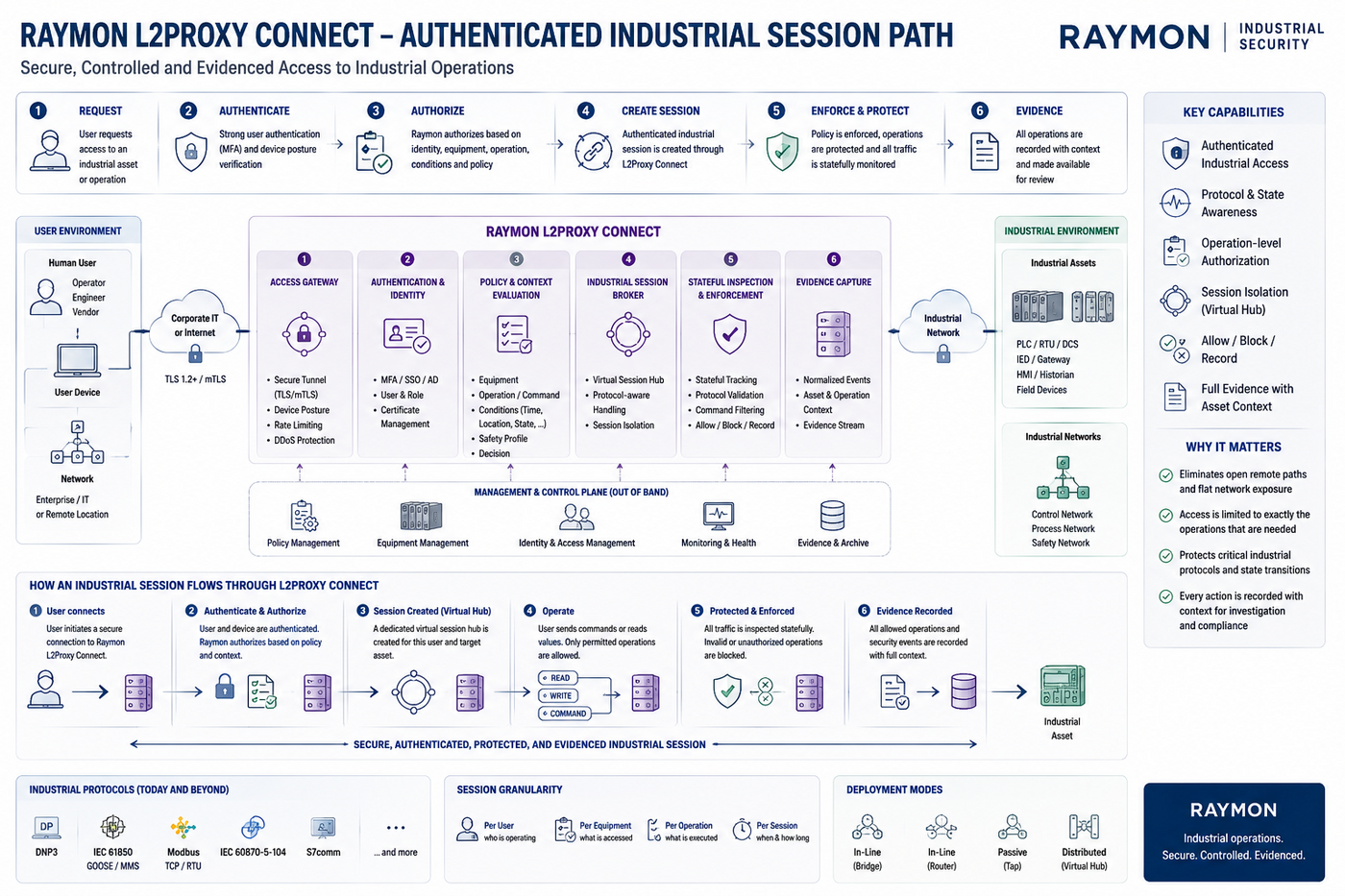
Figure — L2Proxy Connect authenticated industrial session path for secure remote industrial work.
Native session-aware protection
A site can apply different user-specific industrial policies for:
- an OEM vendor supporting one package unit;
- a protection engineer investigating one feeder;
- a transformer specialist performing approved OLTC work;
- a DER specialist operating an intertie;
- an operator with narrowly defined load-shedding authority.
Each live session remains identifiable in the industrial evidence and can be disconnected when the approved work ends or the session is no longer trusted.
Customer benefits
- Reduce standing privilege and lateral access.
- Distinguish observation from control authority.
- Limit a vendor to the equipment and operations required by the work order.
- Apply equipment state and command prerequisites in addition to user approval.
- Disconnect one user's session when work ends without changing other users' policies.
- Retain industrially readable evidence of accepted and denied activity.
Typical lifecycle
- Register the access requirement and accountable owner.
- Select or create the required equipment and rule definitions.
- Compose the user's Access Policies.
- Assemble the complete Policy Profile.
- Activate it through L2Proxy Connect for native user and session awareness.
- Validate representative permitted and denied operations.
- Activate access for the approved work.
- Review evidence and disconnect, disable, or revise access when the need changes.
Where traffic must instead be protected at a general plant boundary, the same policy concepts can be deployed through a standalone L2Proxy service.